How to Automatically Follow Up on Every Past Due PO the Morning It Appears
The daily reality for a production buyer: you sit down, pull the open order report, and see parts that were due days ago. Figuring out where each one stands falls on you. You have to search for previous contact history, decide what to say, send the email, wait for a reply, and then manually log whatever comes back. You should not be hearing from production that something is late. You should be catching it first, with context already in hand and an investigation already started, not building it from scratch every time.
This case study walks through a system that can be used to automatically follow up with suppliers that have past due POs, sending full context with the history of the part in custom messaging. It works with your existing tools and can be set up in under a day. Once running, your team has better visibility into where their parts stand, follow-ups go out automatically the morning they are needed, and every past due line is being actively investigated before the buyer has to start their own search.
An AI agent should investigate your past due parts for you, giving you information before you even have to start doing work.
Past due parts keep slipping because follow-up depends on someone remembering
A production buyer is never specifically tracking which late POs are not yet critical. They are still important to manage because they will become critical. The problem is that attention naturally flows toward what is already urgent, so parts that should have shown up but did not go unnoticed until they become a problem. Your attention is never on which ones should have arrived but did not. You need a system to help surface that. Past due parts escalate quickly once found: they hold up suppliers, hold up production, and create more work than you would have had if the investigation had started sooner.
The current system: manual, reactive, already behind
Working in manufacturing, this is what I saw every day:
- •Past due POs go unnoticed for weeks.
- •Drafting the same reply every time, starting from scratch with no consistent format.
- •Looking back through emails to find context explaining why the PO is late before reaching out.
- •Manually updating the tracker once a reply came back.
What changes: every past due line followed up automatically
Each outcome compounds the bigger your supplier base gets:
- •Every past due line followed up the same morning it appears. No more parts sitting on the report for a week because the buyer did not get to them.
- •Consistent, professional outreach on every PO. Every supplier gets the same quality of communication with the right part and order details, every time.
- •Supplier replies turned into structured records automatically. New ETAs, quantity changes, and delay reasons are extracted and ready to copy into the ERP, without the buyer reading and parsing each email manually.
- •The team always knows where every part stands.
- •Earlier visibility into chronic supplier issues. When a supplier consistently replies late or vaguely, it shows up in the data before it becomes a production problem.
What changed: AI agents make it possible to do the investigating for you
AI agents make it possible to do the investigating for you. When a part shows up past due, the agent does not wait for a buyer to notice. It reads the open order report, identifies the flagged lines, pulls the relevant supplier history, drafts a context-aware follow-up, and sends it. When the reply comes in, it reads and structures it without anyone intervening. The buyer arrives to a picture of where everything stands, not a pile of work to start from scratch.
Want to apply something like this to your operations?
Find Me on LinkedIn4 building blocks make this work
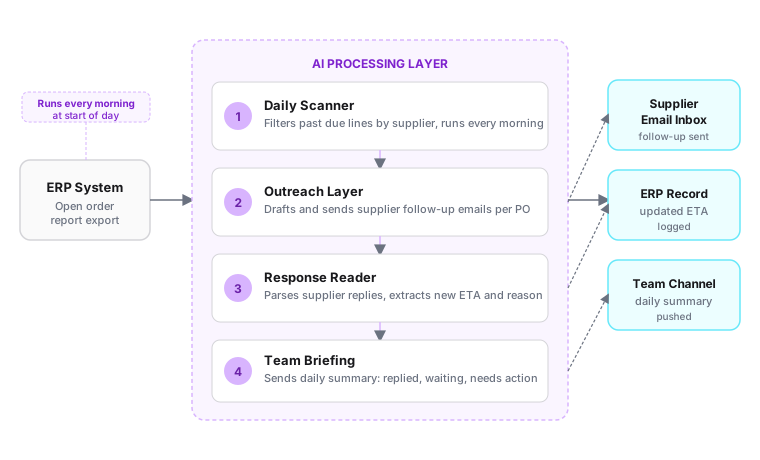
Each component does one job and hands off cleanly to the next:
- •The daily scanner (the watcher). Runs each morning on a schedule, reads the open order report from the ERP, and identifies every line that is past its confirmed ship date. Groups lines by supplier so outreach is consolidated rather than fragmented.
- •The outreach layer (the drafter). Before sending anything, it investigates previous contact history related to the PO to get a full picture, then drafts and sends a professional follow-up with that context included. Not a generic template that gets filtered, but a message grounded in what has already happened on this order.
- •The response reader (the extractor). Monitors the inbox for supplier replies, reads each one, and pulls out the structured update: new expected ship date, quantity changes, and any reason given for the delay. Routes replies that cannot be parsed clearly to the buyer for review.
- •The team briefing (the alert layer). At the end of each day, sends a structured summary to the team via a shared channel or email: which lines were followed up, which have confirmed new dates, and which are still waiting on a response.
What it actually does
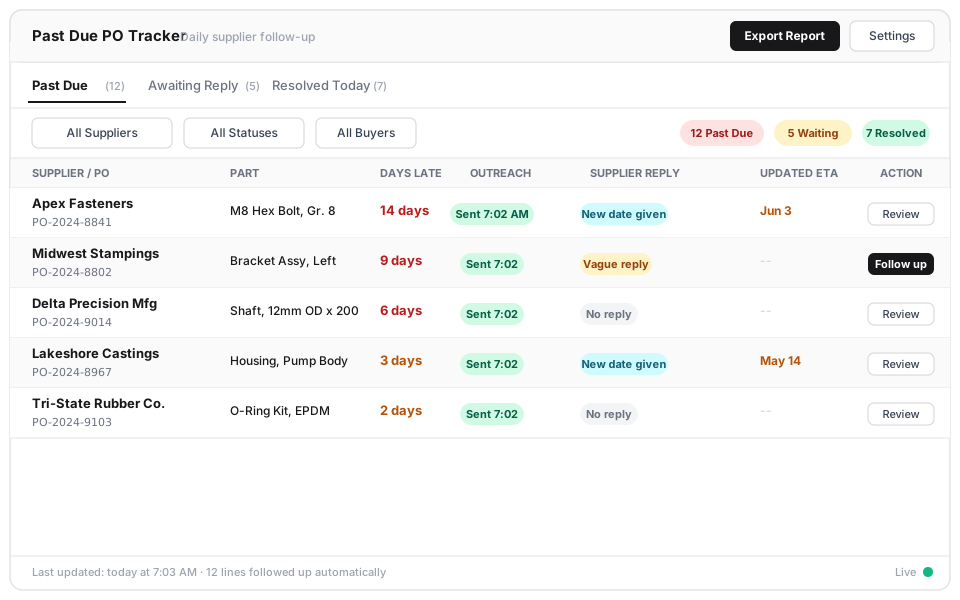
By the time the buyer sits down, they have a full picture of every past due part and know that each one has already been investigated. Here is what the daily output covers:
- •Flagged past due lines: every line past its ship date, grouped by supplier, with days late and original PO date shown.
- •Emails sent: one per supplier (or per PO if preferred), drafted with the relevant part and order details, logged with a timestamp.
- •Supplier reply summary: for each response received, the extracted new ETA, any quantity changes, and the reason given, structured so it can be copied directly into the ERP or tracker.
- •Unresolved flag: any response that came back vague or with no date, surfaced for the buyer to handle personally.
- •Daily team update: a channel message summarizing the full picture: followed up, responded with new date, waiting, and needs attention.
What happens when a supplier reply is vague
Not every supplier replies with a clean new ship date. Some send a one-line "we're working on it." Some reply in a different language. Some do not reply at all. The system handles each case without guessing. If a reply arrives but contains no extractable date or quantity, it is flagged and routed to the buyer with the original message attached. If no reply comes back within a configurable window (typically 24 to 48 hours), the line is re-flagged as unresolved in the next day's summary. If a supplier consistently replies late or vaguely, that pattern shows up in the summary data over time, giving the buyer a basis for a harder conversation. The failure mode is always escalation to a human, not a silent incorrect update to the ERP.
How it works end to end
Each morning at a set time, the scheduler triggers the daily scanner, which pulls the latest open order report from the ERP (via export file or API, depending on the system) and filters for any line where the confirmed ship date has passed. The scanner groups past due lines by supplier and passes each group to the outreach layer, which uses a language model to draft a follow-up email for that supplier, referencing the specific POs and parts, and sends it from the buyer's existing email account. Through the day, incoming supplier replies are monitored in the inbox. Each reply is passed to the response reader, which extracts the key facts and stores them as a structured record: new date, quantity, reason, and a confidence flag indicating whether the reply was clear or ambiguous. At the end of the day, the team briefing pulls all of that day's activity and sends a channel message summarizing the full past due picture. The buyer starts the next morning already knowing which suppliers have responded, which have not, and which lines need personal follow-up.
Why this approach works for this problem
All investigation is handled by the AI. It is doing the work for you, not creating more of it. The naive version of this idea is a scheduled reminder sent directly from the ERP: generic, no context, and suppliers learn quickly to ignore it. It also does nothing with the response, which still lands in an inbox and waits for a human to read it, extract the date, and update the tracker. The approach here is different because the AI handles both directions and brings prior history with it. Outbound emails are specific enough that suppliers treat them like a message from a person. Inbound replies are read and structured automatically, so the information does not sit in an inbox for hours before making it into the system. The pattern generalizes well: any workflow where structured data needs to become professional outbound communication, and where the response needs to be parsed back into structured data, fits this model.
Why this drops in fast
Four practical reasons this is straightforward to put in front of a team:
- •Works with existing tools. Connects to the ERP via a daily export file or API and sends email from the buyer's existing inbox. No new portal for suppliers, no system replacement required.
- •Sets up in under a day. Workflow configuration, email templates, and ERP field mappings take a few hours. The first automated outreach run happens the next morning.
- •Fully configurable to your operation. Days-late threshold, which suppliers are in scope, email tone, reply window before re-flagging, and summary recipients are all adjustable without changing the underlying system.
- •Results start on day one. No training data required. The first morning the system runs, every past due line gets a follow-up. There is no ramp period.
Where this fits more broadly
The same pattern applies anywhere a team is manually reading a status list, drafting outreach emails, waiting for replies, and then manually logging what came back. MRO coordinators tracking maintenance parts on order follow this exact loop. Logistics teams monitoring inbound shipments from freight forwarders do too. Quality buyers sending corrective action requests to suppliers and waiting on 8D responses are in the same position. The underlying principle holds across all of them: structured data in, professional email out, reply parsed back into structured data, team notified. Wherever that shape exists, this approach applies.
Honest limitations
A few things worth naming before putting this in front of a team:
- •Vague supplier replies still need a human. The system extracts dates and quantities cleanly when suppliers provide them. "We're looking into it" with no date gets flagged and routed to the buyer rather than guessed at.
- •Full ERP write-back requires API access. In a first deployment without an ERP API, the structured reply data is surfaced for the buyer to confirm and enter manually. Automatic ERP updates require connecting to the ERP's API or using an export/import step.
- •It does not negotiate. The system follows up and collects updated dates. Pushing back on a date, renegotiating lead time, or escalating a supplier relationship issue still requires the buyer.
- •Coverage depends on what is in the open order report. If a part is missing from the ERP or the export is incomplete, the system does not know to follow up on it.
Want to talk about applying something like this in your operation?
Find Me on LinkedIn