The Morning Briefing That Tells You Exactly What to Act On
Production buyers carry a lot. At any given moment they are managing dozens of open POs, tracking parts across multiple suppliers, fielding emails that range from routine updates to urgent expedite requests, and trying to hold all of it in their heads well enough to act on the right thing at the right time. The cost of getting that wrong is not abstract: a missed follow-up means a part slips past due, a ship date gets blown, and the team ends up paying for premium air freight to make up the difference.
This case study walks through a system built to solve exactly that, one that works with the email and ERP your team already uses, does not change how either of them operates, and can be up and running in a short setup session. Once running, it delivers a complete morning briefing before the buyer sits down, surfaces carryover items that have gone unresolved across multiple days, and gives team leads a shared view of what each buyer is carrying.
Sitting down for the day with a clear picture, in one place, of where your parts stand and where your attention needs to go.
Every shift starts with a reconstruction project
A production buyer's day begins the same way every day: somewhere between arriving and getting to actual work, there is a window where they are piecing together a picture of what needs their attention. That means scanning the previous night's emails, checking part statuses in the ERP, and cross-referencing a list they may or may not have written down the day before. The window can stretch to 30 minutes or more. And if something gets missed in it, whether a follow-up that did not get flagged or a part that crossed into past-due overnight, the cost compounds quickly into expedite fees, strained supplier relationships, and lines waiting on parts that should have been tracked sooner.
The current system: piece it together every morning
Working in manufacturing, this is what I saw every day:
- •The task list existed in fragments: a sticky note, a sent-email thread, a mental note from the previous afternoon.
- •Part statuses lived in the ERP but pulling them out required manual queries; nothing surfaced what was past due without being asked.
- •When a supplier sent a late-night update, there was no guarantee it got seen and actioned by the next morning.
- •Team leads had no visibility into what each buyer was carrying unless they asked directly.
- •Items that did not get resolved one day had no automatic way of showing up the next.
What changes: the briefing is done before you sit down
Each of these outcomes compounds the longer the system runs:
- •Time back at shift start: the 20 to 30 minutes spent manually assembling a task picture each morning is replaced by a briefing that is already done.
- •Nothing slips quietly: carryover tracking ensures that unresolved items accumulate visibility across days rather than getting buried in the inbox.
- •Team transparency without a status meeting: team leads see the same briefing the buyer sees, with no separate report to generate.
- •Fewer expedite fees: follow-ups that would have been missed in a chaotic morning get surfaced before parts cross into past-due territory.
- •A record of every shift: each day's briefing is stored in Notion, giving the team a searchable history of what was flagged, when, and how it was resolved.
What changed: the ability to read email and ERP data together
For a long time, automating this kind of briefing meant picking one source and ignoring the other. Email automation could flag threads but had no concept of part status. ERP dashboards could surface past-due parts but had no awareness of what was happening in supplier conversations. Doing it right meant a human in the middle, holding both pictures at once. What changed is that large language models like Claude can now take unstructured email text and structured ERP data in the same context window and synthesize them into a single coherent output. The combination is what makes a real morning briefing possible: not just a list of overdue parts, not just a summary of email threads, but a prioritized view of what actually needs the buyer's attention and why.
Want to apply something like this to your operations?
Find Me on LinkedIn4 building blocks make this work
Each component does one job and hands off cleanly to the next:
- •The morning trigger (the scheduler). A script fires automatically at shift start each day. The buyer does not initiate anything; the briefing is waiting when they arrive.
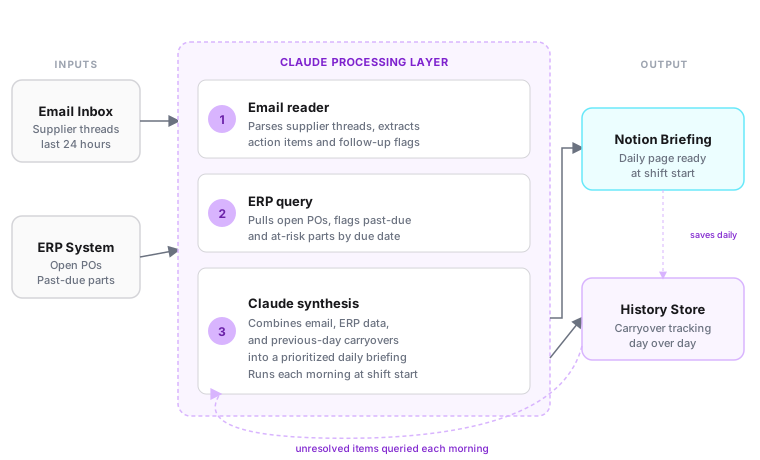
- •The reader (email and ERP fetcher). Connects to the buyer's inbox and the company's ERP. Pulls the last 24 hours of supplier threads and queries open and past-due parts. Neither system is changed or replaced.
- •Claude (the synthesizer). Receives email and ERP data as a combined input. Extracts action items, flags at-risk parts, identifies which threads need a follow-up, and writes the briefing in a structured, readable format.
- •The memory layer (Notion). Stores each day's briefing as a structured record. When the next morning's run fires, it checks what from the previous day was left unresolved and surfaces those items as carryovers in the new briefing.
What the briefing actually contains
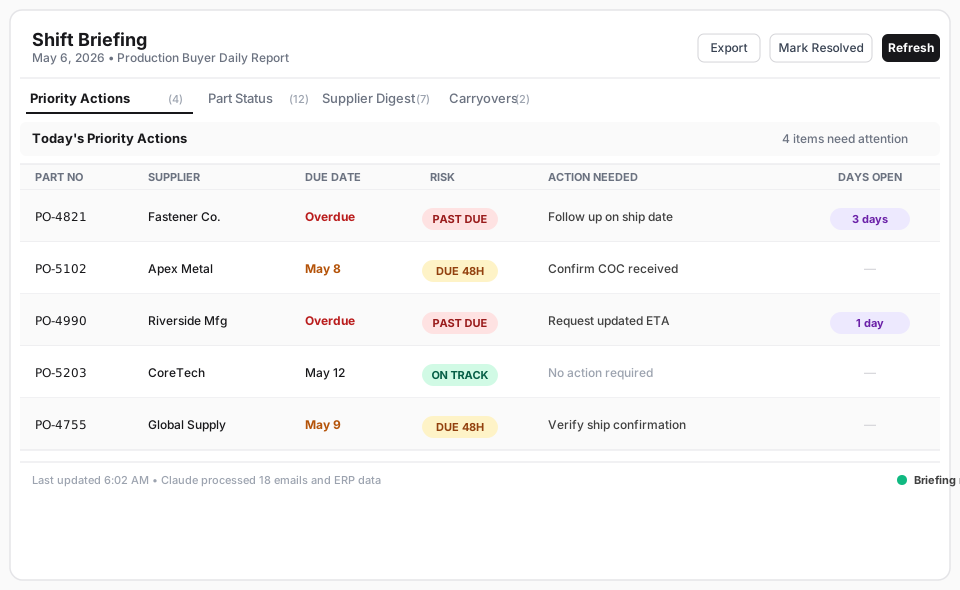
Each morning's briefing is a single Notion page, organized into four clear sections the buyer can move through in minutes.
- •Priority actions: follow-ups that need to go out today, ranked by how overdue the underlying part is.
- •Part status summary: every open part with a due date in the near window, flagged by risk level (past due, due within 48 hours, on track).
- •Supplier thread digest: a one-line summary of each active supplier conversation from the last 24 hours, with a note on whether a response is needed.
- •Carryover flags: items that appeared in the previous day's briefing and were not resolved, with a count of how many consecutive days they have appeared.
How it handles the messy cases
Not every email lands cleanly. Supplier threads sometimes span multiple subjects in a single message, or include both an update and a new request in the same reply. When Claude cannot clearly assign an action item to a specific PO, it flags the thread for the buyer to review rather than making an assumption. Similarly, if a part appears in the ERP without a corresponding email thread, it still surfaces in the briefing under part status but without a supplier context note. The system is designed to surface uncertainty rather than paper over it. The worst outcome is a buyer acting on a confident wrong answer; the better outcome is a buyer spending 30 seconds reviewing one flagged item.
How it works end to end
Each morning, a scheduled script fires before the buyer's shift begins. It connects to the email inbox and pulls every supplier thread from the last 24 hours, extracting the raw text and metadata. In parallel, it queries the ERP for the buyer's open purchase orders, filtering for anything past due or coming due within the next 48 hours. Both datasets are passed to Claude in a single prompt, along with a query to the Notion history store for any carryover items from the previous day's briefing. Claude synthesizes all three inputs into a structured briefing: prioritized actions, part status, supplier digest, and carryover flags. The finished briefing writes to a new Notion page, timestamped for that day. The team lead's view is the same page, accessible without any separate report.
Why synthesis beats a dashboard
The naive approach is a live dashboard: pull ERP data into a table, add a filter for past-due parts, and let the buyer read it. The problem is that a dashboard shows what the data says, not what it means in context. A part that is two days past due with a confirmed delivery email from the supplier this morning is a different situation than a part that is two days past due with no supplier communication since last week. A dashboard cannot make that distinction. Claude can, because it reads both. The synthesis step is what turns two sources of signal into a prioritized action list rather than two separate lists the buyer has to manually reconcile. The same pattern applies anywhere in manufacturing where a person starts their day by combining a structured data source with an unstructured communication channel: the quality engineer reading inspection reports alongside shift notes, the logistics coordinator reconciling carrier updates against a delivery schedule, the ops manager pulling maintenance logs alongside technician emails.
Why this drops in fast
Four practical reasons this is straightforward to put in front of a team:
- •Works with the tools already in place: connects to the email inbox and ERP the team already uses; nothing is replaced or re-trained.
- •Short setup: the connection to email, ERP, and Notion is configured once; after that, the system runs on its own every morning.
- •Adapts to any buyer's workflow: the briefing format, the carryover window, and the part status filters are all adjustable without touching the core pipeline.
- •Results on day one: no training data required, no ramp period; the first briefing is generated from real data the morning after setup completes.
Where this fits beyond the buyer
The same morning briefing pattern works for any manufacturing role that starts a shift by combining a communication channel with a structured data source. A production planner pulling schedule updates alongside shop floor emails. A quality engineer reviewing inspection system flags alongside supplier NCR threads. A logistics coordinator reconciling carrier status updates against a delivery board. In each case the inputs differ but the architecture is identical: a scheduled trigger, a reader that fetches both sources, a synthesis step, and a memory layer that tracks what carries forward. The principle is simple: if a person starts their shift by manually reading two things and combining them in their head, that synthesis can be automated.
Honest limitations
A few things worth naming before putting this in front of a team:
- •The system reads and surfaces; it does not act. Follow-up emails still go through the buyer. The briefing is a prioritized task list, not an automated response engine.
- •Carryover tracking requires discipline. Items need to be marked resolved when they are closed. If they are not, the carryover section accumulates noise rather than signal over time.
- •ERP connectivity requires initial configuration. The core pipeline is the same across systems, but connecting to a specific ERP environment takes setup time that varies by system.
- •The briefing covers what is visible in email and the ERP. Parts or conversations that live outside those two sources, in Slack threads, phone calls, or spreadsheets shared outside the main inbox, will not appear unless those sources are added to the reader.
Want to talk about applying something like this in your operation?
Find Me on LinkedIn