How to See the Status of Every Open PO Without Digging Through Your Inbox
Production buyers have the difficult task of managing hundreds of POs across numerous suppliers, each generating its own email thread of updates, confirmations, delays, and questions. One missed communication can cause production delays, strained supplier relationships, and lost revenue.
This case study walks through a system built to solve exactly that, one that works with the tools your team already uses, doesn't change how you operate, and can be set up in under an hour. Once running, it delivers real-time tracking of every active part across all your suppliers, ensures you never miss a PO update, and gives your whole team a clear, visual way to understand what's happening in your supply chain at any given moment.
Email is where every part status in your supply chain actually lives. Having a system that tracks it visually saves hours and surfaces the information your whole team needs before it becomes a problem.
The buyer's inbox is the system of record, and nobody treats it like one
Buyers in manufacturing live in their inbox. Every PO turns into a multi-week conversation: a quote, an acknowledgment, a delivery confirmation, an expedite, a quality issue, a revised date. The information is all there. It's just buried across hundreds of threads, where the one email that needs attention today is sitting between forty that don't. The cost of missing it isn't theoretical. A late expedite means a line goes down. A missed quality reply means a part ships with the wrong revision. A buyer who spends the first hour of their day triaging email is a buyer who isn't placing the next order.
The current system: an inbox nobody else can see
Working in manufacturing, this is what I saw every day:
- •Open email in the morning. Scan the unread list. Decide what's urgent based on subject lines and sender names.
- •Production coming to you for the status of a part, information already sitting in your inbox, buried in a thread nobody else can see. The buyer becomes the single point of contact for every status question, which means every interruption comes to you.
- •Going back into the same email thread multiple times throughout the day to re-read where a part stands, because nothing is tracking it anywhere else.
- •Know that one missed email can cause a lot of pain.
What changes: full PO visibility without the inbox search
The value compounds the bigger your supplier base gets:
- •Better part tracking. Every supplier email is logged, classified, and tied to a PO, even the ones nobody opened. Status of every active part is one query away.
- •Fewer information silos. When the data lives in a buyer's personal inbox, the rest of the team is locked out. When it lives in a shared dashboard, anyone (production, planning, leadership) can check the status of a part whenever they need to.
- •Faster morning triage. Instead of scanning an inbox to figure out what needs attention, open the dashboard and act on the rows where Action-On is Buyer.
- •An automatic audit trail. "When did the supplier confirm this date?" becomes a one-click answer instead of a search-the-inbox task.
What changed: AI got good enough to read the inbox
Email is the source of truth for buyer-supplier conversations, but it's unstructured. Two years ago, parsing it reliably was a research problem. Today, AI can read a supplier email and answer questions like "is this related to PO #4421?" or "did the supplier just push out the delivery date?" with the same fluency a human buyer would. That's the unlock. The unstructured stream becomes structured data on every message that hits the inbox, without anyone typing.
Want to apply something like this to your operations?
Find Me on LinkedInThree building blocks make this work
This agent is built from two Claude features and one foundational concept. Each does one job:
- •Scheduled tasks (Claude feature). Claude can run a prompt on a recurring schedule, every 30 minutes, hourly, whatever fits the inbox volume. This is the watcher: no server, no cron job, no infrastructure to set up. Just an instruction that wakes Claude up to check the inbox.
- •Prompt engineering (the concept). Instead of one giant prompt that tries to do everything, we use a layered set of small, focused prompts, each with a single job and tight constraints. This is the part that makes the difference between an AI agent that kind of works and one you can trust with the inbox: layering prompts dramatically reduces hallucinations and keeps the agent's classifications honest, because no single prompt is asked to do more than it can reliably do.
- •Live artifacts (Claude feature). A Claude live artifact is a self-contained HTML page Claude builds and keeps updated for you. It reads from the same data the watcher writes to, so the dashboard is always current.
What the agent actually does
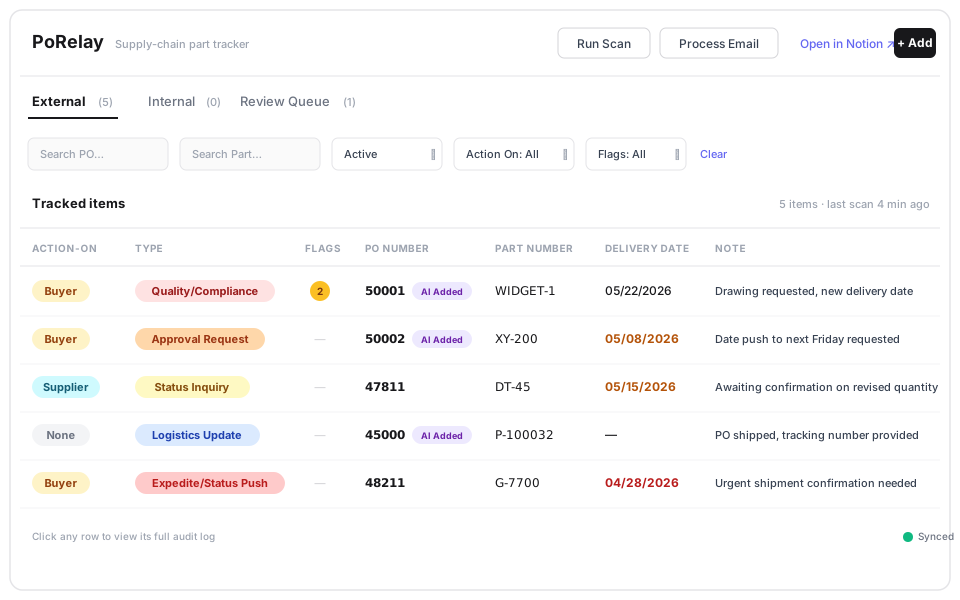
The agent watches the buyer's inbox and maintains a live PO tracker with no data entry, no copy-paste. A single dashboard shows every active PO with the columns that matter:
- •Action-On: does the buyer need to act, or are we waiting on the supplier?
- •Type: is the latest email a status inquiry, an expedite, a quality issue, a logistics update?
- •Delivery date, with overdue ones in red and near-term in amber.
- •Note: a one-line summary of what just happened on this PO.
When the AI isn't sure, the human decides
When the AI isn't certain how to classify an email (say, the sender mentioned a PO number but no part, or referenced two POs in one message), it doesn't guess. It drops that one into a review queue for the buyer to resolve in a few seconds. The failure mode is "ask the human", not "silently get it wrong."
How it works, end to end
Three pieces, designed to run independently of each other. The watcher is a Claude scheduled task that runs every 30 minutes during business hours, pulling the most recent supplier emails and feeding them into the layered prompts. The layered prompts each have a narrow job: Tier 1 is a gatekeeper deciding if the email is even supply-chain related; Tier 2 is a router deciding if it needs action or is informational; Tier 3 is the extractor that pulls out the PO number, part number, delivery date, classification (one of ~18 categories), and a one-line summary. The extracted result then runs through a four-step matching rule against existing tracked items: exact PO + Part match, then PO-only match, then Part-only match, otherwise it's a new candidate or a review-queue entry. The dashboard is a Claude live artifact reading from the same database the watcher writes to. Always current. The buyer can also add items manually or test how an email would be classified before sending it. The whole thing runs inside Claude.

Why prompt engineering matters here
It would be simpler to send every email straight to the most capable model and ask it for everything. It would also be far less reliable. The reason is focus. A single prompt asked to do five jobs at once does each one a little worse and is much more prone to hallucinating its way past edge cases. A small prompt asked to do one job ("is this supply-chain related, yes or no") does it cleanly. Layering prompts also lets you spend the more capable model only where it earns its cost: deep extraction on the small fraction of emails that actually warrant it. This same pattern applies anywhere AI is reading high-volume unstructured input. Customer support tickets. Engineering change requests. Quality non-conformance reports. Layer prompts first, extract second.
Why this drops in fast
Four practical reasons this is straightforward to put in front of your team:
- •Works with the tools you already use. Connects to your existing email inbox and your tracker of choice for storage.
- •Setup takes under an hour. Connect your inbox, point the agent at your tracking database, run the first scan. The dashboard populates immediately.
- •Customizable to how your team works. Your supplier base, your classification categories, your team's workflow: the agent adapts via prompts, not by waiting on a software release.
- •Results show up the moment it runs. First scan equals first day of inbox triage automated. There is no slow ramp, no months of training data, no waiting to see ROI.
Where this fits beyond procurement
Procurement is the most obvious use case because the volume and stakes are both high. But the pattern (scheduled task plus layered prompts plus live artifact) fits anywhere a manufacturing role is bottlenecked by reading unstructured input. Quality teams reading non-conformance emails. Engineering teams handling change requests across a long supplier list. Operations leads triaging shift-handover notes. Anywhere the input is messy, the volume is high, and the output is structured, this pattern works.
Honest limitations
A few caveats worth naming, especially for anyone evaluating this for their own team:
- •The prompts are the product. The accuracy of the agent depends on the quality of the prompts behind it. New email patterns from a new supplier occasionally need a prompt refinement. The review queue catches most of these in the meantime.
- •Customization runs through prompts, not a settings UI. Out-of-the-box configuration covers standard buyer workflows. Adapting it for unusual ERP integrations, custom classification categories, or non-standard email setups currently means editing prompts directly. A friendlier customization layer is on the roadmap.
- •It is not a replacement for an ERP. The agent reads the inbox; it doesn't place orders, manage approvals, or talk to your finance system. It's a tracker, not a transaction system.
Want to talk about applying something like this in your operation?
Find Me on LinkedIn