How Production Buyers Manage Every Task and Action Item Across Email, Slack, and Teams
Production buyers have to manage a lot of tasks, and managing those tasks should be simpler. Every day, new work arrives across different channels, including email threads from suppliers, Slack messages from the team, and Teams chats about open POs. A buyer needs to keep track of all these tasks simultaneously.
This case study walks through a better system for managing your tasks. A system that watches the channels where you work, extracts tasks automatically, and keeps a live dashboard updated.
A production buyer should have a clear picture of every task they have outstanding: what it is, who it's waiting on, and where it stands.
The mental overhead nobody measures
Ask a production buyer what their job is and they'll describe placing orders, managing supplier relationships, hitting ship dates. What they won't describe (because it's invisible overhead, not the job itself) is the constant background process of tracking what they're supposed to be doing. That mental inventory runs all day. "Did I send that drawing?" "Did that supplier follow up with me?" "Did I place that PO I was asked for?" Work arrives in fragments and being able to manage those makes the difference between successful supply chains and ones that are always chasing action items or hearing about delays from production.
The current system: sticky notes, memory, and hope
The honest version of how most buyers track their open items today:
- •A personal to-do list (Notes, a notepad, a sticky) that gets updated manually and is never fully current.
- •An inbox treated as a task list: things stay unread until they're done, which works until the volume gets high.
- •Memory. The good buyers carry a running mental model of every open item, every waiting-on status, every follow-up due. They're reliable. They're also one sick day away from dropping something.
- •End-of-day catch-up that surfaces what slipped through. Usually too late.
What changes: every task captured, nothing left in your head
The value is clearest on high-volume days, when the channels are moving fast and tasks are arriving faster than anyone can triage:
- •Nothing falls through. Every task monitored so you always know what actions you need to take.
- •Clarity at the start of every day. Walk in, open the board, look at Waiting on You. That's the work. No inbox scan, no reconstructing the list from memory.
- •A shared view for the whole team. When the task list lives in someone's head or a personal to-do app, the rest of the team is locked out. When it lives on a shared board, people can go to the board to check status instead of coming to you, and anyone (a manager, a backup, a planner) can see what's in flight.
- •An automatic record of what happened. "Did we ever follow up on that drawing request?" becomes a one-click answer, not a thread search.
What changed: AI got good enough to extract tasks from conversation
A supplier email that says "Can you send over the latest drawing for PO 412345?" is a task. A Slack message that says "Tempo moved the ship date, can someone approve?" is a task. A Teams thread about a quality hold ending with "Ridgeline needs your sign-off to release the hold" is a task. Humans read these and extract the action item instantly. Until recently, software couldn't. Two years ago, doing this reliably across unstructured messages from multiple channels was a hard research problem. Today, Claude can read any of these messages and identify: is there a task here, who owns it, what PO is it about, and is it waiting on the buyer or the supplier? That's the unlock. What was an invisible, manually-maintained mental inventory becomes a structured, always-current list, automatically.
Want to apply something like this to your operations?
Find Me on LinkedInThree building blocks make this work
The system is built from two Claude features and one foundational concept:
- •Scheduled tasks (Claude feature). Claude can run a prompt on a recurring schedule, every 30 minutes, hourly, whatever fits the volume. This is the watcher: no server, no cron job. Just an instruction that wakes Claude up to check the channels.
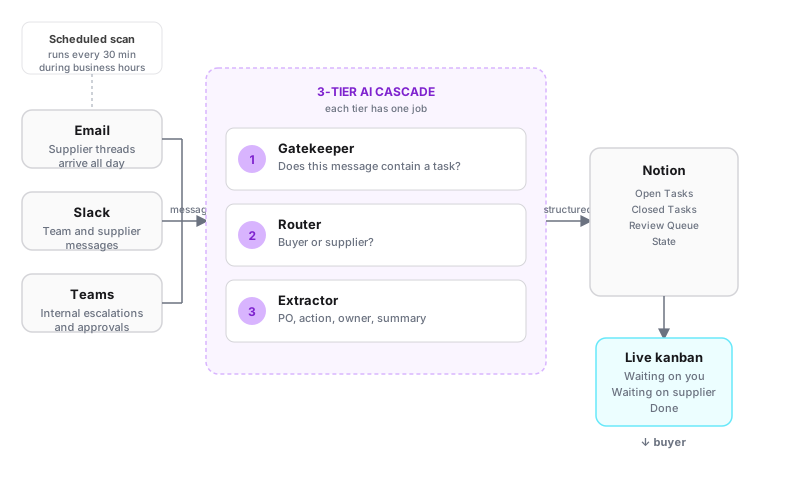
- •Prompt engineering (the concept). Instead of one large prompt trying to do everything at once, the system uses a layered set of small, focused prompts, each with a single job. One checks whether a message contains a task at all. Another figures out who owns it. A third extracts the PO number, the action required, and a one-line summary. Layering prompts this way dramatically reduces errors, because no single prompt is asked to do more than it can reliably do.
- •Live artifacts (Claude feature). A Claude live artifact is a self-contained HTML page Claude builds and keeps updated for you. It reads from the same task database the watcher writes to, so the board is always current.
What the agent actually does
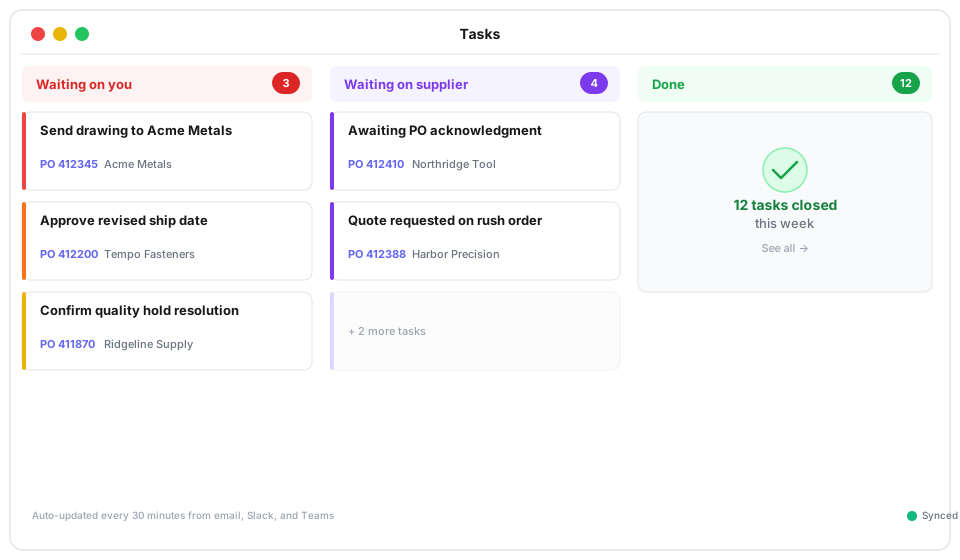
The agent watches where information comes in and maintains a live task board. Every task extracted from any message lands on the board automatically, tagged with the PO, the supplier, and where it stands:
- •Waiting on you: tasks where the buyer needs to act. Sending a drawing, approving a date change, confirming a quality resolution.
- •Waiting on supplier: items the buyer is tracking but can't move themselves. PO acknowledgments, quotes, responses to open questions.
- •Done: closed items from the week, so nothing disappears without a record.
When the AI isn't sure, the human decides
When a message is ambiguous (say, someone mentioned a PO but didn't specify an action, or the same thread touched three different open items), the agent doesn't guess. It surfaces the message with a note in a review queue for the buyer to resolve in a few seconds. The failure mode is "flag it for the human", not "invent a task that doesn't exist" or "silently skip it."
How it works, end to end
Three pieces, each doing one job. The watcher is a Claude scheduled task that polls email, Slack, and Teams for new messages on whatever cadence makes sense for the team, typically every 30 minutes during business hours. Each run feeds new messages through the layered prompts. Tier 1 checks: does this message contain a task at all, or is it informational noise? Tier 2 decides: if there's a task, does it sit with the buyer or the supplier? Tier 3 extracts the PO number, the supplier name, the action required, and a one-line summary. The extracted task then checks against the existing board: new item, update to something already open, or a resolution that closes an existing task. The board is a Claude live artifact that reads from the Notion database the watcher writes to. Always current. The buyer can also add tasks manually for items that came in verbally or through other channels. The whole system runs inside Claude.
Why prompt engineering matters here
It would be simpler to send every message straight to the most capable model and ask it to do everything at once. It would also be far less reliable. The reason is focus. A single prompt asked to do five jobs at once does each one worse and is more prone to over-extracting tasks that aren't there or missing ones that are. A small prompt asked to do one job ("does this message contain a task that requires buyer action, yes or no") does it cleanly. Layering prompts also lets you use the more capable model only where it earns its cost: deep extraction on the fraction of messages that actually warrant it. This same pattern applies anywhere AI is reading high-volume unstructured input. Shift-handover notes. Non-conformance reports. Engineering change requests. Layer first, extract second.
Simple to get up and running
Four practical reasons this is straightforward to put in front of a team:
- •Works with the channels you already use. Gmail, Slack, Teams: connect what you use. Nothing changes about how your suppliers communicate or how your team operates.
- •Setup is a single day. Connect the channels, point the agent at your task database, run the first scan. The board populates from whatever is currently in flight.
- •Adapts to how your team works. Your PO structure, your supplier base, your definition of what counts as a task: the agent adapts through prompts, not by waiting on a software release.
- •Results from the first run. Every task currently buried in your channels surfaces immediately. There is no ramp, no training period, no waiting to see the board fill up.
Where this fits beyond procurement
Procurement is the highest-volume case because the channels are active all day and the cost of a dropped task is a missed ship date. But the pattern (watch unstructured channels, extract tasks, keep a board current) fits anywhere work arrives as conversation. Quality engineers triaging non-conformance threads. Operations leads tracking open items from shift-handover notes. Maintenance coordinators pulling action items from technician messages. Anywhere the volume is high, the channel is unstructured, and tasks are currently living in someone's head, this approach works.
Honest limitations
A few caveats worth naming:
- •The prompts are the product. Accuracy depends on the quality of the prompts behind it. New message patterns from a new supplier or communication style occasionally need a refinement. The review queue catches most edge cases in the meantime.
- •Customization runs through prompts, not a settings UI. Standard buyer workflows are covered out of the box. Unusual task types, non-standard PO formats, or channel configurations outside Gmail, Slack, and Teams currently mean editing prompts directly.
- •Single-user first; team rollout is a different shape. The personal-agent version runs in one user's environment. A team rollout shifts to a server-side scanner writing to a shared database with a shared board. Doable, but a different deployment.
- •It tracks tasks, not approvals. The agent identifies work and keeps it visible. It doesn't route approvals, enforce sign-off chains, or integrate with ERP workflows. It's a tracker, not a workflow engine.
Want to talk about applying something like this in your operation?
Find Me on LinkedIn